In today’s data-driven world, businesses gather and analyze information from an ever-growing array of sources. Data source is a term you’ll often hear in analytics discussions – but what does it really mean? Simply put, a data source refers to the origin or location where data comes from. It can be the system or file in which data was first generated or digitized, or even an intermediate location that other processes access for information. In this article, we’ll explore the meaning of data sources, where data comes from, the different types of data sources (with examples), and why they matter for businesses and marketers. We’ll also address common questions and provide practical examples to illustrate key points.
In This Article
What is a Data Source?
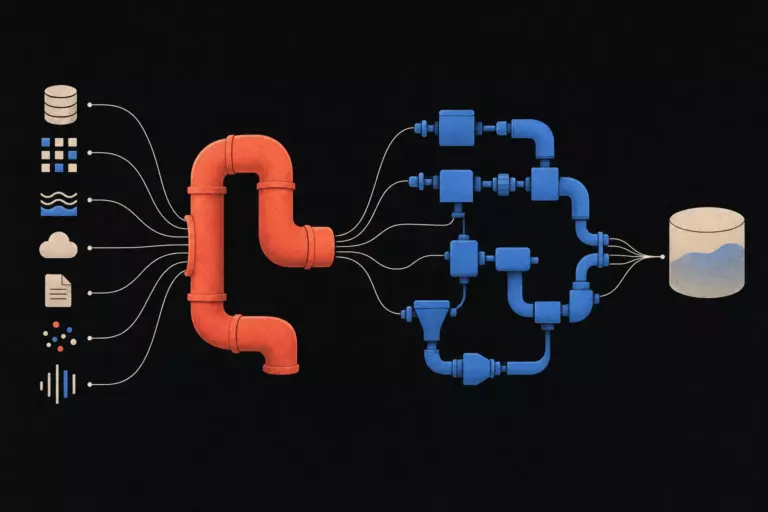
A data source is the origin of a specific set of data or information. In other words, it’s the place where data is obtained. This could be an initial repository where data is born (like a transaction being recorded in a database) or any system that holds data which other applications or analysts use. For example, a data source could be a database, a spreadsheet file, an IoT sensor stream, or a web API – essentially any location storing or providing data.
Importantly, even refined or processed data can act as a source for further analysis. As long as one process or tool is accessing data from somewhere, that “somewhere” is considered a data source. For instance, a cleaned CSV file might serve as a data source for a visualization tool. What matters is that it’s the point of origin from the perspective of the data consumer.
To clarify with a simple scenario: imagine a fashion brand selling products online. When the website displays that an item is “out of stock,” it pulls that information from an inventory database. In this case, the inventory database is the data source providing stock data to the website. Without that data source, the website wouldn’t know the product’s availability. This example shows how a data source functions as the provider of needed data in a business context.
Where Does Data Come From?
Data can originate from a wide variety of places and systems. Here are some common sources from which data is generated or collected:
- Databases and Data Warehouses: Many businesses store transactional data in relational databases (e.g., an SQL database for sales records) or aggregate large amounts of information in data warehouses. These systems are primary data sources for reporting and analysis.
- Spreadsheets and Files: Simple files like Excel spreadsheets or CSV files can be data sources. For example, a marketer might have an Excel file of lead contacts – that file is a data source for a email campaign tool.
- Web Applications and APIs: Online platforms often provide APIs (Application Programming Interfaces) that allow other systems to fetch data. For instance, social media sites can act as data sources by offering APIs to retrieve posts or engagement metrics. Web scraping tools can also extract data from websites, effectively turning a website into a data source for analysis.
- Sensors and IoT Devices: Physical devices in the Internet of Things (IoT) generate streams of data (e.g. a temperature sensor logging readings). These live measurements are data sources that feed into IoT platforms or databases for monitoring and analysis.
- Internal Business Applications: Enterprise software like CRM (Customer Relationship Management) systems, ERP systems, or even email marketing platforms produce data (customer profiles, transactions, email open rates, etc.). These internal systems are valuable data sources created by an organization’s own processes (sometimes called internal data sources).
- External Sources and Public Data: Not all data a business uses comes from within the organization. Companies often rely on external data sources such as market research reports, third-party data providers, or open datasets. For example, government open data portals provide free public data on demographics, economics, health, etc., which can be used as open data sources for analysis.
Source data is often referred to as raw data or primary data, especially when it hasn’t been processed yet. For instance, the unedited survey responses collected by a company would be raw source data (originating perhaps from a survey tool database).
It’s worth noting that extremely large collections of data – “big data” – may come from many of the above sources in unison. Big data sets often require special frameworks to handle their volume and variety. But fundamentally, big or small, all data has to come from somewhere, and that origin point is what we call a data source.
Types of Data Sources
Data sources can be categorized in multiple ways. Two useful ways to classify data sources are: (1) by how they are technically accessed (machine vs. file data sources), and (2) by the data’s relationship to the organization (internal, external, etc.). Understanding these types helps in managing and integrating data effectively.
Machine Data Sources vs. File Data Sources
When dealing with data systems (especially in IT and analytics software), you may encounter the terms machine data source and file data source. These refer to how connection information for the data is stored and used:
- Machine Data Sources: These are data sources tied to a specific computer or server (the “machine”). The connection details (like server address, driver, credentials) are typically saved on the local machine or in the environment where the data-consuming application runs. Machine data sources often have a name defined by a user and may not be easily shared to other machines. In essence, the data source is registered on a particular system. For example, on a company’s analytics server, an ODBC connection to a customer database might be set up as a machine data source – only that server “knows” how to connect using the stored config.
- File Data Sources: These data sources encapsulate all the connection information in a portable file (often with a .dsn extension). The file can be copied or moved, making the data source definition shareable across different systems or with other users. Applications can use the file to know how to connect to the data. This is handy for standardizing connections. For instance, a file data source might be created for an analytics team to connect to a sales database – the .dsn file can be distributed so everyone connects the same way. Unlike machine sources, file data sources aren’t bound to one device and can be used simultaneously by multiple systems.
Why do these distinctions matter? It mostly matters in technical settings when configuring data connections. If you’ve ever set up an ODBC data source on Windows, you had to choose between machine-specific or file DSNs. Machine data sources are convenient for local use, whereas file data sources are great for sharing connection configs. Both types serve the same purpose: packaging the details needed to reach the actual data.
Internal vs. External Data Sources (and More)
Another way to classify data sources is by where the data originates in relation to your organization. In data analytics, we often talk about: internal data, external data, third-party data, and open data. These categories help businesses think about the provenance and accessibility of the data they use:
- Internal Data Sources: These are data sources generated from within your organization’s own operations and systems. They include things like your sales database, internal product usage logs, CRM records, employee surveys, or any data created by your business processes. For example, your website’s analytics (first-party web analytics data) and customer purchase history are internal data sources. Internal data is typically proprietary and under your control, often considered highly valuable because it’s specific to your business.
- External Data Sources: External sources come from outside the organization. This could be data collected or published by other organizations, industry reports, social media data, market trend datasets, or competitor information. For instance, demographic statistics from a government census or market prices gathered from the web are external. Businesses use external data to gain context (like market benchmarks or broader consumer trends) that their internal data alone might not provide.
- Third-Party Data/Analytics: Third-party data usually refers to data provided by an external entity that specializes in collecting or aggregating data. In the context of analytics tools, third-party analytics sources are often platforms that offer data about your own business but through an external service. A good example is Google Analytics – it’s a third-party platform that collects data on your website’s visitors and provides it back to you. The Google Analytics platform itself is a data source (you retrieve data from Google’s system), and the data is about your site but gathered via a third party. Other examples include social media analytics dashboards or data enrichment services that provide additional information on your customers.
- Open Data Sources: Open data refers to data that is publicly available for anyone to use. Open data sources include government open data portals, public research datasets, open-source projects, and so on. These sources are free to access. For instance, the World Bank provides open data on global development indicators; a city government might publish open data on traffic or public transportation. Such data can be very useful for analysis and is often used to supplement internal data with broader context. Open data is typically external as well, but it’s distinguished by its public, non-proprietary nature.
Beyond these categories, you might also hear terms like first-party vs. second-party vs. third-party data in marketing contexts. First-party data is essentially the same as internal (your own data), second-party is someone else’s first-party data that you have access to (often through partnerships), and third-party is data collected by brokers or aggregators not directly from the source individual. The exact definitions can vary, but the core idea is understanding where data comes from and who controls it.
By knowing whether a data source is internal, external, third-party, or open, you can better judge its relevance, reliability, and how to integrate it. For example, internal data might be immediately usable but could be limited in scope, while external data might need validation or transformation to fit with your internal datasets.
Examples of Data Sources in Action
To solidify our understanding, let’s look at a few real-world examples of data sources and how they are used in data analytics:
- E-commerce Inventory Database: Consider the earlier example of an online fashion retailer. The company maintains an inventory database that tracks product stock levels. When a customer views a product on the website, the site queries the inventory database to see if that item is in stock. Here, the inventory database is the data source for stock information, and the web application is the consumer of that data. This setup ensures that users see up-to-date stock statuses, and it relies on a reliable internal data source (the database) to drive a seamless shopping experience. If the database is inaccurate or offline, the website would show wrong information – highlighting why a solid data source is critical.
- Web Analytics and Sales Data Combination: Imagine a marketing team that wants to analyze how website traffic is converting into sales. They might pull data from Google Analytics (a third-party analytics data source) to get website visitor metrics and combine it with data from their internal sales database (an internal data source). Google Analytics will provide information like number of visitors, traffic sources, and user behavior on the site. The sales database provides data on purchases made. By blending these two sources, the team can discover insights like which traffic source yields the most customers or how user engagement correlates with sales. In this scenario, both the Google Analytics platform and the sales DB are distinct data sources that need to be brought together for analysis.
- IoT Sensor Data in Manufacturing: Consider a manufacturing company that installs IoT sensors on its machinery. Each sensor records metrics such as temperature, pressure, or run-time and sends that data to a cloud-based system in real time. Those sensor readings are data sources for the company’s analytics. For example, a dashboard might pull live measurements from these sensors to alert managers if a machine is overheating. The raw sensor data (often called streaming data) originates from physical devices on the factory floor. By treating the sensor feeds as data sources, the company can perform predictive maintenance analytics – analyzing trends over time to predict failures. This example shows a case of continuous data sources producing a flow of data points that analysts have to manage.
- Public Demographic Data for Market Analysis: A small business expanding into a new region might use a public demographic dataset (say from a government census bureau) as an open data source. They could combine this with their internal customer data to identify target market segments in that region. The public dataset acts as a source of external information that, when analyzed alongside company data, helps in strategic decision-making. For instance, knowing the age and income distribution (from the open data) in an area alongside the company’s own sales records can highlight which products might sell well there.
Each of these examples underscores a common theme: most analytics projects involve multiple data sources. It’s rare that all insights come from a single source of data. By identifying and leveraging the right mix of sources – whether internal databases, third-party tools, or external datasets – businesses can answer complex questions. However, using multiple sources also introduces challenges in terms of integration and consistency, which we’ll touch on next.
Why Data Sources Are Important in Data Analytics
Data sources are the lifeblood of data analytics. Without data sources, there is no data to analyze! But beyond that obvious fact, there are several reasons why understanding and managing data sources is so important for entrepreneurs, business owners, and marketers:
- Informed Decision-Making: The quality and relevance of insights you gain are directly tied to the data sources you use. If your data sources are rich and reliable, your analyses will be grounded in reality. On the other hand, if you’re pulling from outdated or irrelevant sources, your conclusions might be flawed. Knowing what the source of data is helps you judge its credibility and timeliness. For example, data on customer behavior coming from your own CRM system can guide marketing strategy, while ignoring that internal source in favor of generic industry stats might lead you astray. In short, good data sources lead to good insights.
- Efficiency Through Integration: Modern businesses use many different software tools and platforms – each could be a data source (sales, marketing, operations, finance, etc. all have their data). For powerful analysis, we often need to integrate disparate data sources to get a complete picture. Well-defined data sources “bundle information into accessible formats,” enabling seamless connections between systems. For instance, a data source might package connection details and structure so that a BI (business intelligence) tool can easily pull data without you manually exporting/importing files. This reduces friction – analysts can focus on interpreting data rather than wrangling with how to access it. Data sources essentially hide the technical complexities of connection, so you can concentrate on analysis.
- Consistency and Accuracy: When everyone in an organization is pulling from the same data sources, it ensures that there’s a single source of truth for key metrics. Imagine if your finance team uses one spreadsheet for revenue numbers while your marketing team uses a different report – you could end up with conflicting figures. Establishing official data sources (like a centralized database or data warehouse) means that all stakeholders are referencing the same origin for data, promoting consistency. Additionally, a well-managed data source will maintain data integrity (accuracy, completeness) over time, whereas ad-hoc data collected without oversight might be error-prone.
- Speed and Scalability: Pre-defining data sources and using appropriate tools can make data retrieval faster. For example, connecting directly to a database via an API or data source connection is much quicker and more scalable than manually gathering data. This is crucial as your data volume grows. As mentioned earlier, big data requires scalable solutions – part of that is optimizing how data sources feed into your analysis pipelines. Setting up good data source connections (like data pipelines from various systems into a warehouse) can automate and accelerate the flow of data, so you always have up-to-date information for decision-making.
- Focus on Analysis, Not Data Chasing: Ultimately, a well-structured data source strategy lets analysts and business users spend more time on interpreting data rather than collecting or cleaning it. When a data source is properly integrated, the end-user doesn’t need to know all the technical details of how to fetch the data. For example, a marketer using a dashboard might not need to know the intricacies of the SQL queries pulling from a database – they just see the results. Data sources serve to package the technical connection information in one place and keep it out of the analyst’s way. This abstraction is powerful: it means you can plug in new sources or update connections in the backend without disrupting how people consume the data.
Given these points, it’s clear that data sources aren’t just a tech concern – they’re a business concern. For entrepreneurs and new marketers, thinking about data sources means asking questions like: “Where is this data coming from? Can I trust it? Am I missing any data sources that could give me insight? How do I combine these sources effectively?” These questions are at the heart of building a data-driven business.
Challenges: On the flip side, working with multiple data sources can be challenging. Data may come in different formats, frequencies, or qualities. Integrating data from a CRM, an Excel file, and a social media API, for example, might require data transformation and cleaning. There could also be issues of data silos (data trapped in one system not easily accessible to others). Overcoming these challenges often requires a solid data infrastructure and strategy.
In summary, data sources and how you handle them can make or break your analytics efforts. Tapping into the right data sources – and combining them when needed – gives you the raw material for insights. Managing those sources well ensures that your insights are accurate and timely. It’s a foundational aspect of any successful data strategy.
Frequently Asked Questions (FAQ)
Data Sources & Sourcing: Frequently Asked Questions
What is the definition of a data source?
A data source is defined as the location or origin where data is obtained. It’s basically any place that holds data which you use for analysis or processing. For example, a database, a CSV file, or an API can each be a data source.
In short, if you ask “Where did this data come from?”, the answer to that question (e.g. “from our sales database”) is the data source.
Where does data come from in business analytics?
Data for business analytics can come from many places. Internal systems like databases, CRMs, and logs generate data about customers, sales, and operations. Additionally, data might come from external sources such as market research firms, social media platforms, or government open data.
Even manual data collection (surveys, interviews) produces data that has to be stored somewhere (spreadsheets, databases) – those storage locations are the data sources analysts pull from. In essence, data comes from any system or repository where it is created or stored, ranging from on-premise corporate databases to cloud services and public websites.
What are some examples of data sources?
There are countless examples, but here are a few common data sources:
- Relational Database: e.g., an SQL database like MySQL or PostgreSQL storing customers and orders.
- Spreadsheets: e.g., an Excel file with budget data or a Google Sheet with marketing leads.
- Web Analytics Platform: e.g., Google Analytics which provides website traffic data as a source.
- APIs and Online Services: e.g., a Salesforce CRM API providing sales pipeline data, or a weather API giving weather data.
- IoT Device Feeds: e.g., a smart thermostat’s sensor data feed, which is a source of temperature readings.
- Flat Files: e.g., a CSV or JSON file exported from a system, which can be read as a data source by analysis tools.
- Data Warehouse: e.g., a Snowflake or BigQuery data warehouse that consolidates data from various operational databases – often used as a central source for analytics.
Each of these is a data source because you can retrieve data from it for some analytical purpose.
What is data sourcing?
Data sourcing is the process of identifying, collecting, and importing data from various sources for use in analysis or other business purposes. In other words, it’s how organizations gather and bring in data from both internal and external sources.
This often involves extracting data from source systems, transforming it as needed, and loading it into a central location (a process often called ETL – Extract, Transform, Load).
For example, if a company wants to do a comprehensive analysis, the data sourcing process might include pulling customer data from a CRM database, getting marketing metrics from Google Analytics, and scraping product reviews from the web – and then combining all those.
Effective data sourcing is systematic and ensures the data collected is relevant, high-quality, and ready for use. One example of data sourcing in action is a firm gathering social media data and internal sales data to feed into an AI model – they need to source data from the social platforms (via APIs) and their own databases, then merge it. The term “data sourcing” emphasizes the process of gathering data, whereas “data source” refers to the actual origin point of the data.
How do I choose the right data sources for my needs?
Choosing the right data sources depends on what question you’re trying to answer or what problem you need to solve. Here are a few tips:
- Relevance: Identify which data directly relates to your business question. If you want to improve customer retention, relevant sources might be your customer database and support ticket logs (internal), and perhaps social media sentiment data (external).
- Quality and Reliability: Prefer sources that are known to be accurate and up-to-date. For instance, an official system of record (like your finance system) is a better source for revenue data than an ad-hoc spreadsheet someone maintains manually. Evaluate external sources for credibility – e.g., official government data vs. an unknown blog.
- Accessibility: Consider how easy it is to get the data. Some data sources might require technical integration or have costs (e.g., a third-party data provider might charge for API access). Ensure you have the tools and permissions to access the source. Sometimes a readily accessible source, even if not perfect, can be more useful than a “perfect” source that you cannot obtain in time.
- Combine as Needed: Often, one source won’t have everything. Don’t be afraid to use multiple data sources in combination. Just plan for how to join or relate the data (for example, using common keys like customer ID or dates).
- Compliance and Ethics: Especially for external data (like personal data from third parties), ensure you have the right to use it. Choose sources that comply with data protection laws and respect user privacy.
- Consult with Experts: Talk to your IT or data team – they often know what data sources exist internally or externally for a given domain. There might be existing data pipelines or warehouses you can tap into rather than reinventing the wheel.
Remember, the goal is to have data that helps answer your question with confidence. The right sources are those that together provide a complete and truthful picture for your analysis.
Conclusion
Data sources are a fundamental concept in data analytics – they are literally where all information originates. For entrepreneurs and beginner marketers, understanding data sources means you’re thinking critically about where your insights come from. Whether it’s an internal database showing your sales performance or an external trend report offering market benchmarks, knowing your data sources helps you trust and verify your analysis.
In this article, we defined what a data source is and saw that it’s essentially any place where data resides, ready to be used. We explored common places data comes from – databases, files, IoT devices, web services, and more. We also broke down types of data sources, from technical distinctions (machine vs file-based) to origin-based categories (internal, external, third-party, open). Real-world examples illustrated how different data sources play out in business scenarios, from an inventory database powering an e-commerce site to analytics tools and sensor feeds driving decision-making.
Crucially, we discussed why data sources matter. Good analytics depends on good data, and that in turn depends on having the right data sources and managing them well. By integrating data from the appropriate sources, businesses can unlock a holistic understanding of their performance and environment. Conversely, neglecting important data sources or mismanaging data integration can lead to blind spots or inaccuracies.
As you build out your data-driven strategy, always consider: What are my data sources? Are there additional sources that could provide insight? How do I ensure these sources are reliable and easy to work with? By addressing these questions, you set the stage for more effective analysis. And remember, you don’t have to do it alone – leveraging experts or tools to help connect and maintain your data sources (for instance, implementing a robust data warehouse or hiring data consultants) can pay off tremendously in clarity and time saved.In the end, data sources are the foundation of the information age. Mastering them is key to turning raw data into actionable knowledge that drives business success. Stay curious about where your data comes from, and you’ll be well on your way to becoming a savvy data-driven professional.
About the author
Nick Valiotti is the founder of Valiotti Data. 15+ years building analytics infrastructure for SaaS, marketplaces, and consumer subscription. 50+ production deployments across BigQuery, Snowflake, dbt, Metabase, and modern BI stacks. Author of two books on data strategy. LinkedIn · Discovery call.
![[REVIEW] Looker Studio vs Power BI 2026](https://valiotti.com/wp-content/uploads/2026/06/looker-studio-vs-power-bi-2026-hero-768x512.png)