This is a walk-through of one consulting engagement, not a theoretical piece on AI tooling. The brief was small enough to time end-to-end, and the result was useful enough to be worth writing up. Twenty minutes of wall-clock, BigQuery + Dataform + Claude Code + an MCP server, and at the end of it a working subcontractor-efficiency data mart with every column we needed, plus first-pass documentation on each of the underlying staging tables. The story includes one genuine mistake the model made and how we caught it, because that’s the part of the workflow most articles on AI-assisted data engineering quietly skip.
In This Article
The setup
The client is a mid-sized field-services company — they run repair work for electrical and plumbing systems, and the customer-facing layer is a network of subcontractors who actually go out and do the jobs. Their data infrastructure is straightforward by 2026 standards: BigQuery for storage, Dataform for transformation, Looker Studio on top.
The brief: build a data mart about subcontractor efficiency. Which subcontractors close jobs faster, which have higher customer satisfaction, which are taking on too many open jobs at once, which have margin issues. The data lives across a few staging tables in BigQuery; the mart needs to be one flat per-subcontractor table the downstream dashboards can consume.
In a normal engagement this is a two-to-three-day task. Write the staging-table documentation. Design the mart schema. Write the SQL. Validate it against a known subcontractor. Add tests. Open the PR. With Claude over MCP we wanted to see if we could compress that to an afternoon.
Before the session
The one piece of setup that has to happen first is configuring a BigQuery MCP server. Google’s official documentation has step-by-step instructions, and I won’t repeat them — if you follow the docs, it works, and the common failure modes (auth scopes, project IDs) are covered there.
What matters for this article: at the end of the setup, Claude Code on the engineer’s laptop can talk to BigQuery the way the engineer would — list datasets, read schemas, run queries against sample data. It can read; it can also write where you grant the permission. There is no Git MCP and no Dataform MCP in the setup we used. The model writes SQLX files directly to the local Dataform repo and the engineer pushes them through normal git.
The session, command by command
I’m going to walk through this in the order it happened, because the order is the workflow.
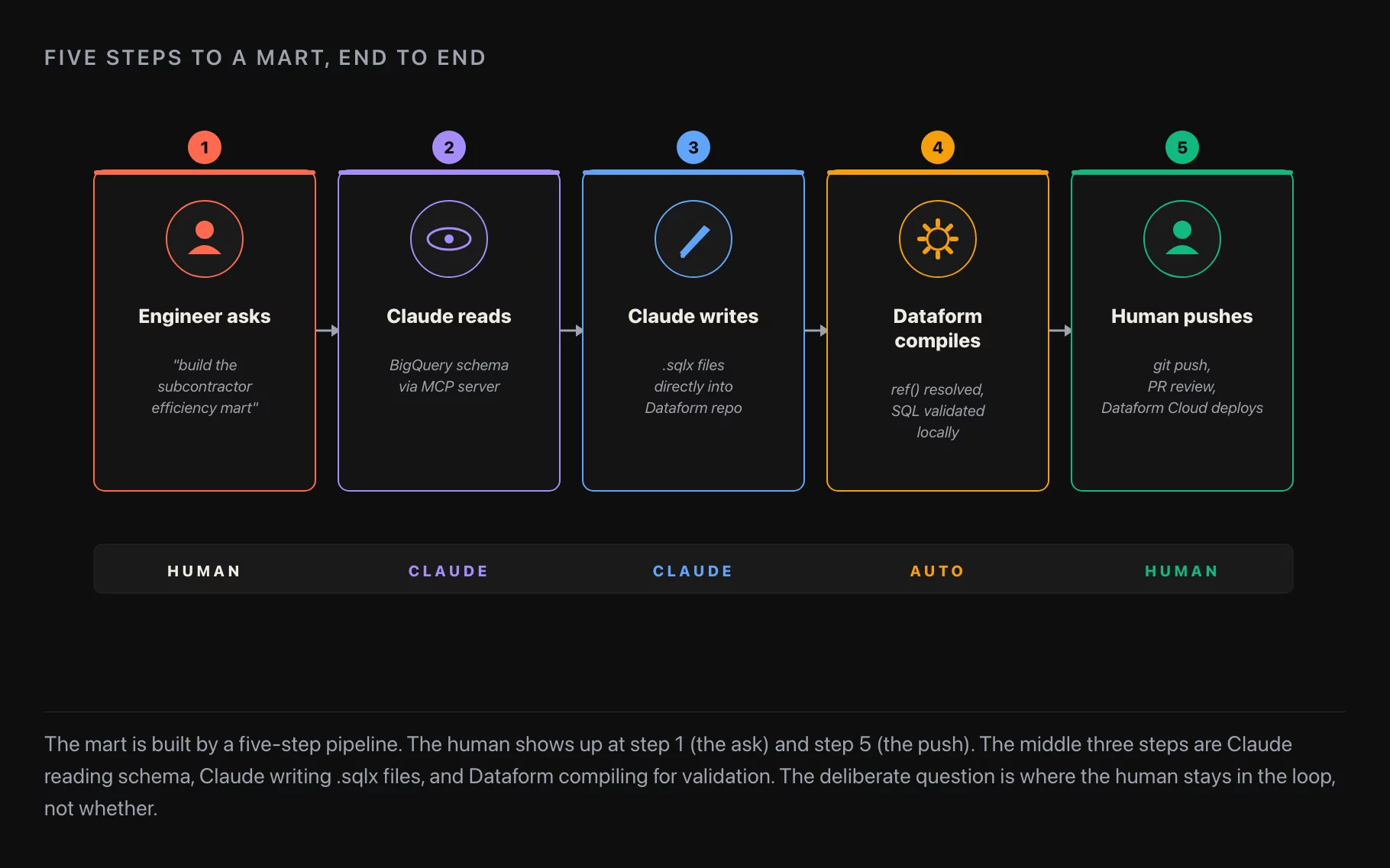
Step 1. Launch Claude Code and grant it access to mcp.json. Once Claude has the MCP config file, it sees the list of datasets in BigQuery.
Step 2. The first command is always the same. Before asking Claude to build anything, I ask it to “prepare descriptions of the staging tables.” This is the recommendation I’d give anyone starting from a blank session: have the model walk the schema first and write itself a description of each table and the relationships between them. It costs a few minutes, but it changes everything Claude does afterward. Without the schema walk, the model invents column names that look reasonable but don’t exist. With the walk, it references real columns and surfaces real questions (“the status column has values you didn’t mention — should I treat cancelled differently from closed?”).
Claude starts running, counting tokens, sending queries to BigQuery. Permissions come up — it asks before running a query, before writing a file, before committing anything. The right discipline is to approve permissions one at a time, not as a batch. If you trust that Claude isn’t going to break production, you can grant a wider permission scope up front; but the safer pattern, and the one I default to in client engagements, is granular approval. Each approval is a small chance to catch the model trying to do something you didn’t mean.
When the staging documentation is done, the changes show up in the context window. Read them. They are not always right; they are usually 90% right and 10% needs adjustment. The 10% is exactly where the human is still in the loop.
Step 3. Build the mart. “Build the subcontractor efficiency mart” in the prompt. The advice I’d repeat to anyone trying this: don’t overestimate the AI, don’t give it overly complex tasks, break them into separate steps. A mart with 25 columns and four cross-table joins is a complex task, and asking Claude to build it as a single prompt produces a model that burns tokens and ships something that doesn’t compile. The same task as five sub-prompts (“first build the activity aggregation,” “now add the customer-satisfaction columns,” “now add the open-jobs columns,” “now add the margin columns,” “now wire them together as the mart”) works in 20 minutes and produces something that compiles and runs.
You can check the progress while it works — pop into Dataform, look at what it’s drafting. Once Claude says it’s done, push + commit, then go into Dataform proper and look at the result.
The mistake
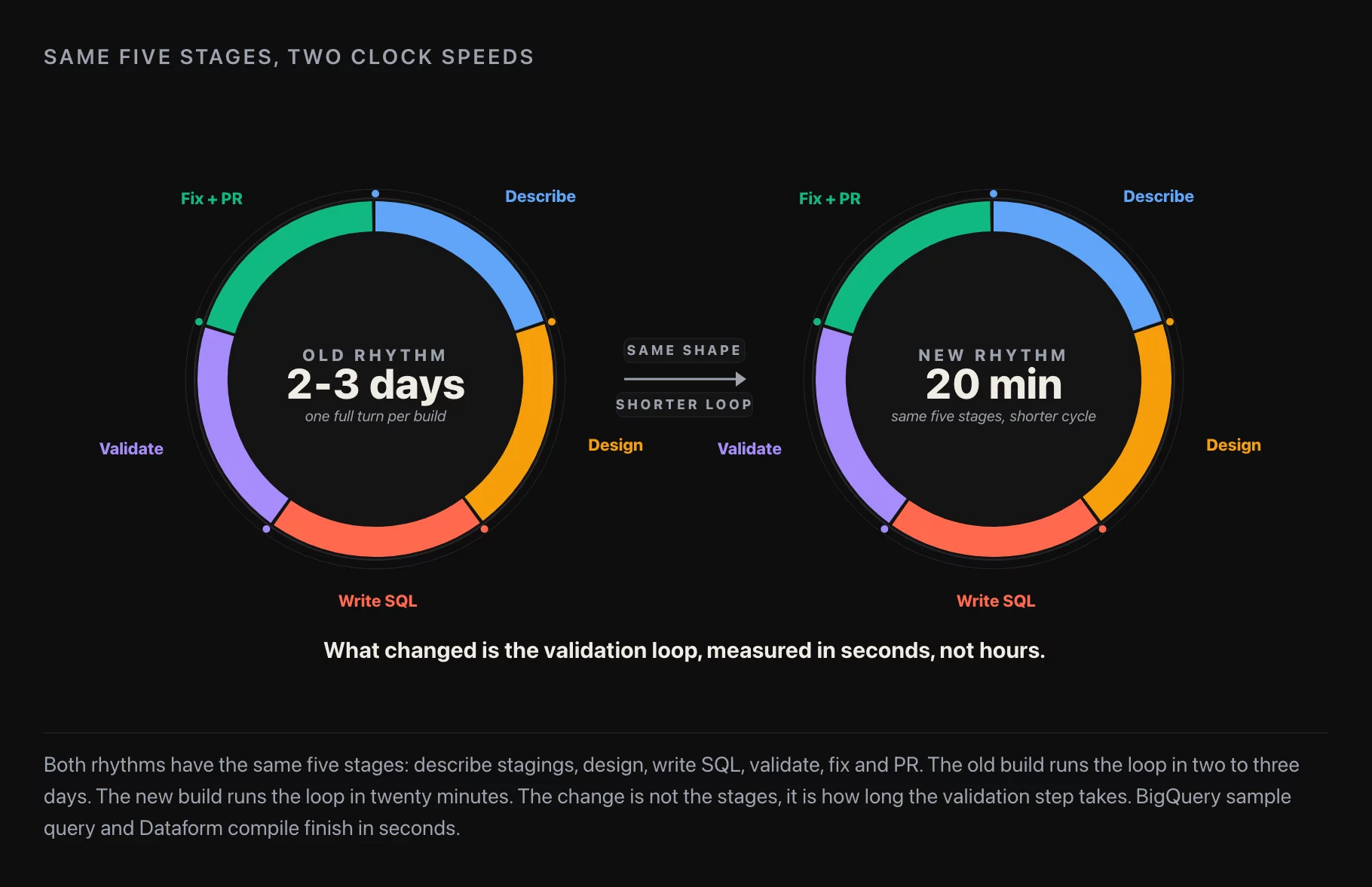
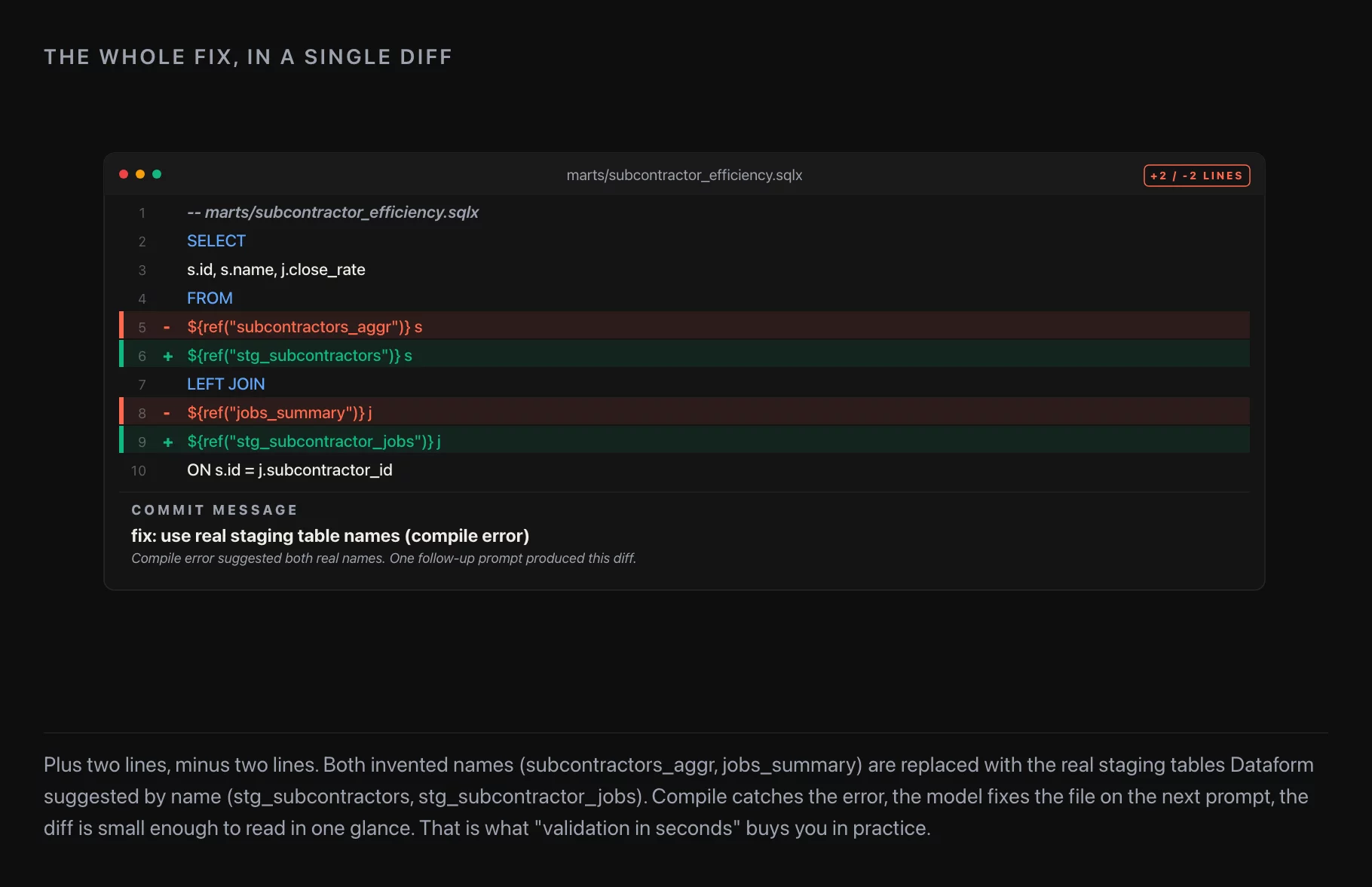
The first version of the mart didn’t work. Claude had referenced non-existent tables in ref() — the Dataform mechanism for declaring a dependency between models. The compile failed cleanly with a clear error message; the table names Claude used didn’t exist in the project.
I left this in the original Habr write-up on purpose, and I’ll leave it in here for the same reason: this is exactly the failure mode you’re guarding against by keeping tasks small. A model asked to build a 25-column mart in one shot will often invent table names that fit the pattern of the real ones. A model asked to build five sub-tasks, each with a clear validation step, will catch its own mistakes more often than not — and the ones it doesn’t catch are caught by you on the per-step review.
The fix was a follow-up prompt: “be more careful with ref() — the staging tables are these specific names.” Claude fixed the references, re-ran the compile, and the mart built clean.
This is the part of the workflow that needs human judgment. Not because the model is bad — Claude is genuinely good at this in 2026 — but because the failure modes are exactly the kind a confident-but-wrong junior engineer would make. Inventing table names. Assuming a column exists because it would logically be useful. Skipping the deduplication step because the sample query “looks fine.” The defense isn’t to write more code review; the defense is to break the task small enough that each piece has an obvious validation step.
The result
Twenty minutes of wall-clock from “launch Claude Code” to “the mart compiles, the data looks right, the staging tables have first-pass documentation.” A second 20 minutes to add my own column-naming polish (engagement metrics had Russian-style names in places where the downstream dashboards needed English) and a few unique-key assertions on the mart’s primary key. Forty minutes total, against a two-to-three-day budget for the same work without MCP. That ratio holds up in repeat engagements; it’s not a one-off.
The point I want to leave with is not “AI builds the mart for you.” It’s that the warehouse + transformation + MCP + LLM stack compresses the build-validate-fix loop from minutes-to-hours to seconds. The shape of the work doesn’t change. The cycle time does. And once the cycle time drops below a threshold, the workflow itself reorganizes around having a draft to discuss with the stakeholder, rather than a ticket to estimate.
A checklist for trying this on your own warehouse
If you want to reproduce the workflow on BigQuery + Dataform (Snowflake + dbt works the same with cosmetic changes), the prerequisites are:
- BigQuery MCP server configured per Google’s official docs; sample-query permissions on the source datasets
- A modeling tool (Dataform or dbt) with a working compile loop, so each generated model can be validated before merge
- One canonical “validation row” — a known customer, subcontractor, account, whatever fits — that you use to sample-query against during the build
- A discipline of breaking the task into sub-prompts, each with an obvious validation step
- Granular permissions (approve each tool use individually until you trust the session), not a blanket allow-all
- A merge gate: even a 20-minute mart goes through a PR before it lands in production
If any of those are missing, the loop misses a step and the workflow falls back to “model prints SQL to the terminal that you paste manually.” That defeats the entire point.
One closing note
Without MCP and access to the warehouse, Claude couldn’t have done this task at all. Without Claude, a human could have done it but would have spent much more than 20 minutes — even counting the ref() mistake. That’s an unambiguous argument for using AI in this part of the data-engineering workflow, on the condition that the client agrees and that the discipline of small tasks + granular permissions + per-step validation is followed. Both conditions matter.
If you want to read more like this, I write about data and consulting on my Telegram channel Коля Валиотти • Дата консалтинг.
Further reading
- Migrating Off Redash, For The Last Time — picking the BI tool that consumes marts like this one
- 10 Dashboard Design Rules, Six Years Later — what the dashboards on top of the mart should look like