Metabase is the only BI tool we cheerfully install for a team that has never used BI before. It is also the tool we most often help teams migrate off of, 18 months later. Both of those sentences are honest, both stay true year after year, and the gap between them is exactly the shape of this article.
In This Article
We have shipped Metabase to enough teams to have a worked opinion. The short version: Metabase is the right answer for most teams between 20 and 200 people, with a few clear conditions, and the wrong answer in a handful of specific situations that the marketing copy never warns you about. This is the long version of that recommendation.
The pitch, and why it actually holds up
Metabase is the BI tool a non-technical user can sit down in front of and produce a chart with. That sentence is not always true of BI tools. It is true of Metabase.
The Question builder is the core of the product. You point it at a table, you pick a metric, you pick a dimension, you pick a visualization. You get a chart. The whole interaction takes a couple of minutes. No SQL, no semantic layer, no joins to configure. For the seventy or eighty percent of business questions that boil down to “show me X grouped by Y over time,” the Question builder is the right interface and it shines.
The dashboard layer is a thin grid where you arrange saved Questions. Drag, drop, resize, save. Filters propagate. The result looks utilitarian rather than designer-polished, but it loads fast and people read it. That last bit is the one most BI vendors lose on; a dashboard that loads slowly is a dashboard nobody opens.

The honest comparison on time-to-first-chart is the one that explains the adoption curve. Metabase will get a new analyst from “fresh install” to “their first useful chart in front of a stakeholder” in roughly fifteen minutes. Looker Studio is close. Superset is an hour or two. Tableau and Looker are most of an afternoon, mostly spent on the modeling layer before you get to draw a single rectangle.
That speed is not a small win. It is the reason Metabase wins the first quarter at most teams. It is also the reason teams underestimate what they are buying, because the things that make a BI tool feel slow on day one are often the things that prevent disasters on day three hundred.
What Metabase actually is, separated from the pitch
Metabase is two things glued together: a SQL editor with chart presets organized into folders of saved Questions, and a dashboard layer on top of those Questions. Both are good. Neither is what most teams think they are buying.
Most teams think they are buying a self-serve BI tool. That phrase implies business users will explore the data themselves, answer their own questions, and stop bothering the analyst. In practice this works for about three months on simple data, then breaks. By month four every “self-serve” dashboard has at least one stakeholder who keeps asking the analyst what a specific number means. The model that actually fits Metabase is: analysts build the saved Questions, stakeholders consume them on dashboards, and the SQL editor is mostly an analyst tool, not a stakeholder tool. The marketing never says that out loud, but it is the working assumption we bring to every Metabase engagement.
Once you accept that, Metabase becomes a much cleaner buy. You are not paying for self-serve. You are paying for a fast, lightweight, opinionated frontend that turns SQL into dashboards with the minimum amount of analyst time per dashboard. That is genuinely valuable and worth the price.
The ceiling, in four examples
The thing teams underestimate about Metabase is the ceiling. The Question builder is excellent on simple data and degrades faster than people expect as the data model gets more complex.

Four representative tasks, plotted against effort:
A single-table chart (group by day, count rows) is trivial. The Question builder was designed for exactly this and gets out of the way. This is the lower-left corner, and it covers the seventy percent of dashboard work that does not actually need a BI tool past Metabase.
A three-table join is awkward. The Question builder caps you at two joins per question; the workaround is to write a SQL query, save it as a Model, and build downstream Questions on top. Most teams hit this in the first month and figure out the Model pattern. Annoying but fine.
A wide pivot table breaks. Metabase tables cannot pin a column, cannot freeze a row, and pagination kicks in faster than stakeholders expect. The fix is either to redesign the report (smaller tables, more of them) or to live with the friction. We have lost real engagements to this single limitation.
A window function inside the Question builder is impossible. You drop to SQL Query mode for the entire question, and at that point the builder is not helping you anyway. This is where the “self-serve BI” framing collapses; if half your questions require SQL, you do not have a self-serve tool, you have a SQL editor with charts.
Metabase shines on the upper-left quadrant and loses you in the lower-right. The ceiling is high enough for most teams. If your work lives in the lower-right consistently, you should be using a more capable tool.
OSS, Pro, Cloud: what you actually get
The Metabase pricing story is more honest than most BI tools’ pricing stories, and it is still easy to misread. Three tiers, real differences between them, and a clear “should we pay” question.
The open-source version is genuinely free and genuinely useful. Question builder, dashboards, SQL Query mode, Models, alerts, email and Slack delivery, twenty-plus database connectors. You self-host the Java application, you run the metadata database, you handle SSO setup, you eat the operational cost.
The Pro tier (starting around $85 per month for the smallest serious size) unlocks governance features: sandbox-based row-level security, audit logs, advanced embedding, and the SSO connectors that the enterprise IT department will ask for. Pricing scales with seats. Pro is self-hostable or cloud-hosted; the licensing is the same either way.
The Cloud tier (also from around $85 per month) is hosted Metabase with the Pro feature set. Backups, upgrades, and a maintained SSL endpoint are included. The trade-off is that you give up the ability to run it inside your own VPC, which matters for some regulated industries and not at all for most teams.
The decision rule for OSS versus Pro is mostly about governance. If you do not have a regulator asking you about audit logs, do not have customers who need to be sandboxed inside the same Metabase instance, and do not need SSO, the OSS version is enough. The moment one of those three lands on your roadmap, the price of Pro is much smaller than the price of building the missing features yourself.
The decision rule for self-host versus Cloud is mostly about ops cost. Below roughly thirty active users on the same instance, self-host is fine and the operational tax is real but manageable. Above that, the Cloud price starts to undercut the engineering hours you spend on backups, upgrades, and SSO maintenance. By a hundred users on the same instance, self-host has serious operational friction (query queues, metadata DB scaling, slow dashboards because every panel hits the warehouse independently), and the math almost always favors Cloud or a serious investment in hosting it properly.
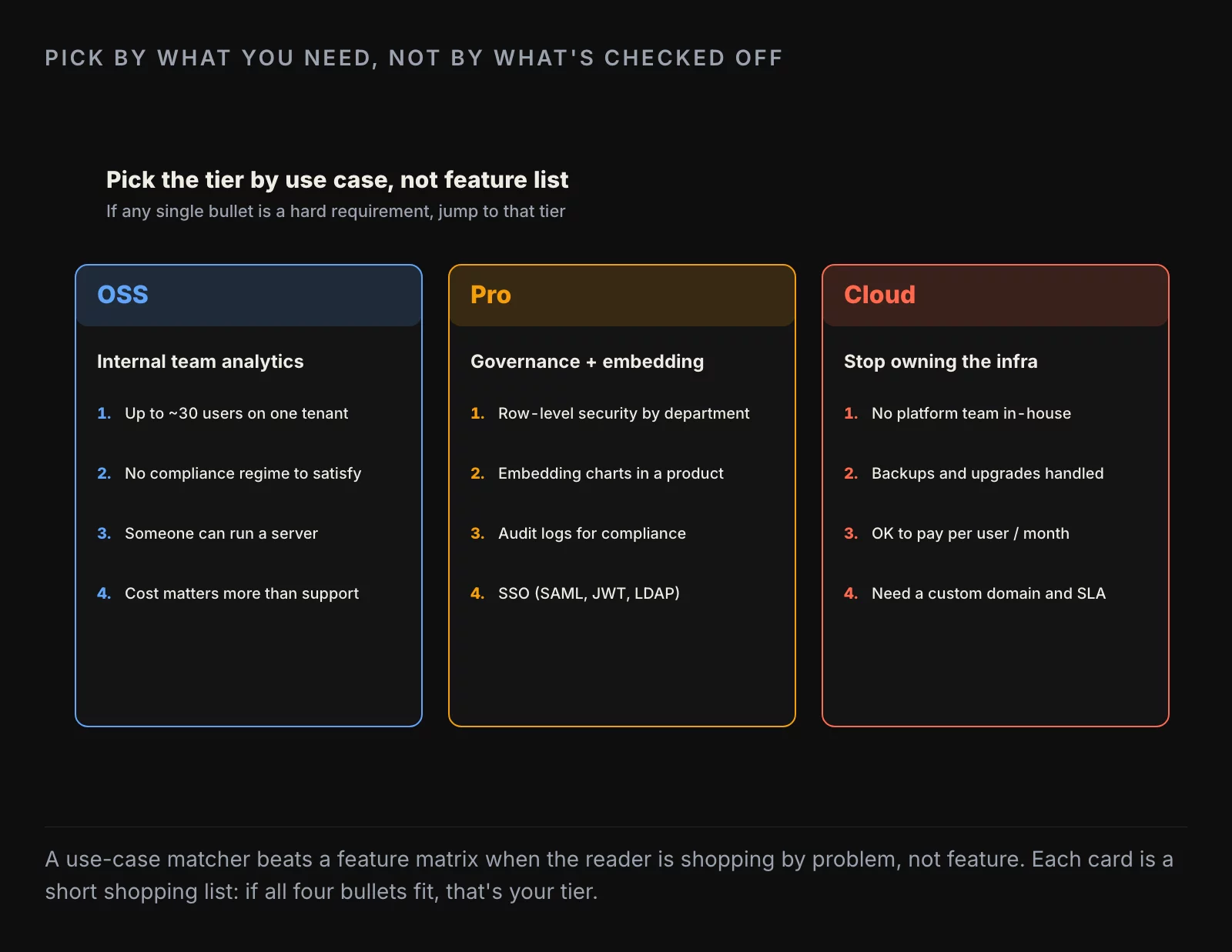
Stay-on-OSS checklist. Six conditions, each one tilting the answer toward “the free tier is the right call.” If three or more of them apply to you, you are probably buying complexity you do not need by going to Pro. If half or more do not apply, the Pro tier is doing real work for the money.
The failure modes nobody mentions in the demo
Three patterns we see often enough to flag them upfront.
The saved-question explosion. A team starts with thirty Questions. By month twelve they have a hundred and fifty. By month twenty-four they have four hundred. Nobody knows which Questions are still current, which are duplicates, which feed which dashboards, and which were one-off Slack requests that someone forgot to delete. The fix is not a Metabase feature; the fix is to put dbt in front of Metabase, define metrics in dbt, and expose only the mart tables to Metabase. Questions become thin wrappers around modeled tables. If you are buying Metabase expecting governed metrics out of the box, you are buying the wrong tool. Buy Metabase plus dbt and accept that the metric governance lives in dbt.
The embedding tax. Metabase embedding is one of the most undersold features in the product. Static embedding is free in the open-source version. Interactive embedding, which is what most product teams actually want for customer-facing analytics, requires Pro. For an internal team of ten the Pro price is fine. For a customer-facing analytics surface inside your SaaS product with hundreds of paying tenants, model the cost carefully before you commit. At that scale the honest comparison is not Metabase versus Tableau but Metabase Pro versus building a thin custom analytics page on top of your warehouse with a charting library.
The 100+ user self-host wall. The open-source Java application runs fine for fifty users. Past a hundred, things start to crack: query queues get long, dashboards slow down because each panel hits the warehouse independently, the default H2 metadata store falls over and you have to migrate to Postgres, SSO setup fails halfway through a certificate rotation. The Cloud version solves most of this in exchange for a per-user price. The break-even is usually around thirty to fifty users plus a real Postgres metadata store plus SSO. Below that, self-host. Above that, pay for Cloud or commit to running it like real production infrastructure.
When to use Metabase, when to outgrow it
The short version of the decision rule:
Pick Metabase if your team is between roughly twenty and two hundred people, you have a warehouse with a reasonably clean data model (or you are committing to put dbt in front of it), you have at least one analyst who can write SQL, and you are not embedding customer-facing analytics at scale. That covers most of the teams we work with.
Outgrow Metabase if your data model grows past fifteen or twenty tables that need to be joined in interesting ways, your governance requirements pass what sandbox-based RLS can handle, your stakeholders need sub-second dashboard latency on serious data volumes, or your dashboard author count grows past twenty. At that scale, Superset (with the platform engineer to operate it), Looker (with the budget to license it), or Tableau (with the patience to model in it) are all worth the conversation. If the next stop is specifically Power BI, the Metabase vs Power BI comparison walks through the decision criteria head-to-head.
Skip Metabase entirely if your team is under twenty people and you are still answering most questions in spreadsheets and SQL notebooks. A BI tool at that size adds process overhead without adding speed. Ship the spreadsheets and the notebooks, and revisit BI when the team grows.
The honest summary
The friendliest tool in the room is rarely the most powerful. Sometimes that is exactly what you need; sometimes it is the thing that costs you a quarter when the data model finally outgrows the question builder. Metabase wins the first year at most teams we work with. The question is whether year three is still a win, and the answer depends on how disciplined you have been about what runs on the BI layer versus what runs underneath it.
Buy Metabase plus dbt. Build dashboards on top of mart tables. Reserve SQL Query mode for the questions that genuinely need it. Move to Pro or Cloud when the governance or ops cost stops making sense. Plan the migration off, if it comes, the moment the ceiling shows up rather than two quarters later.
That is the working playbook. Most of the failure modes we see are teams that skipped one of those steps.
![[REVIEW] Looker Studio vs Power BI 2026](https://valiotti.com/wp-content/uploads/2026/06/looker-studio-vs-power-bi-2026-hero-768x512.png)